Amongst my classmates and I, DHCP has been a point of confusion. In particular, which MAC addresses and IP addresses are used in each of the different message types. This post is an attempt to to clarify that by analyzing Wireshark captures between a DHCP server hosted on a Cisco switch, and a DHCP client on a Cisco router.
Table of contents
Open Table of contents
Overview
DHCP is a framework that is used by devices to pass around configuration information on a TCPIP network (RFC 2131). When a device boots up for the first time, it reaches out to a DHCP server to obtain configuration parameters. Furthermore, it allows the DHCP server a method for allocating IP address.
The most basic parameters that a DHCP client obtains from a DHCP server are the following:
- IP Address
- Subnet mask
- Default-gateway
- DNS server
There are also a lot more optional parameters, but for a basic understanding, these are the most important parameters to remember.
DORA Process
In order for the client and server to exchange this information, they use UDP as a transport protocol and following a standard process called the DORA process.
The client always communicates using port 68, and the server always communicates using port 67.
Client to server: src port 68, dest port 67
Server to client: src port 67, dest port 68
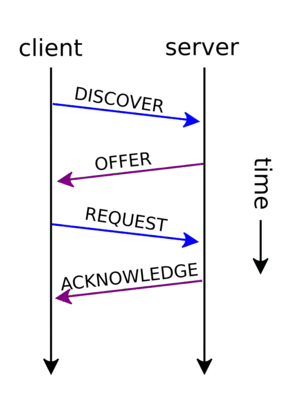
The DORA process is short for Discover, Offer, Request, Acknowledge, and is the process that a client and server use to exchange information.
-
Discover: client broadcasts a DHCPDISCOVER message, attempting to reach out to the DHCP server.
-
Offer: server broadcasts a DHCPOFFER response, providing the client with all of the configuration parameters we listed above (IP address, subnet mask, default-gateway, DNS server).
-
Request: client broadcasts a DHCPREQUEST message, telling the server that it either wants to accept or decline the offer that was made.
-
Acknowledge: server broadcasts a DHCPACKNOWLEDGE message, confirming that client has now been registered with the parameters it requested.
Lease Time
One important point that we have glossed over is how long a client may hold onto the parameters that is was given. DHCP is given to a client based on a lease, which can vary depending the server configuration. It can vary, but typical durations would be anywhere from 30 minutes on a public wireless network, to 24 hours in an enterprise or home LAN. Usually, before the lease expires, the client will reach out to the DHCP server with a request message, asking for the same parameters. If the lease expires before the client requests to renew it, then the server will make that IP address available for new clients that are connecting.
Wireshark Capture (Broadcast)
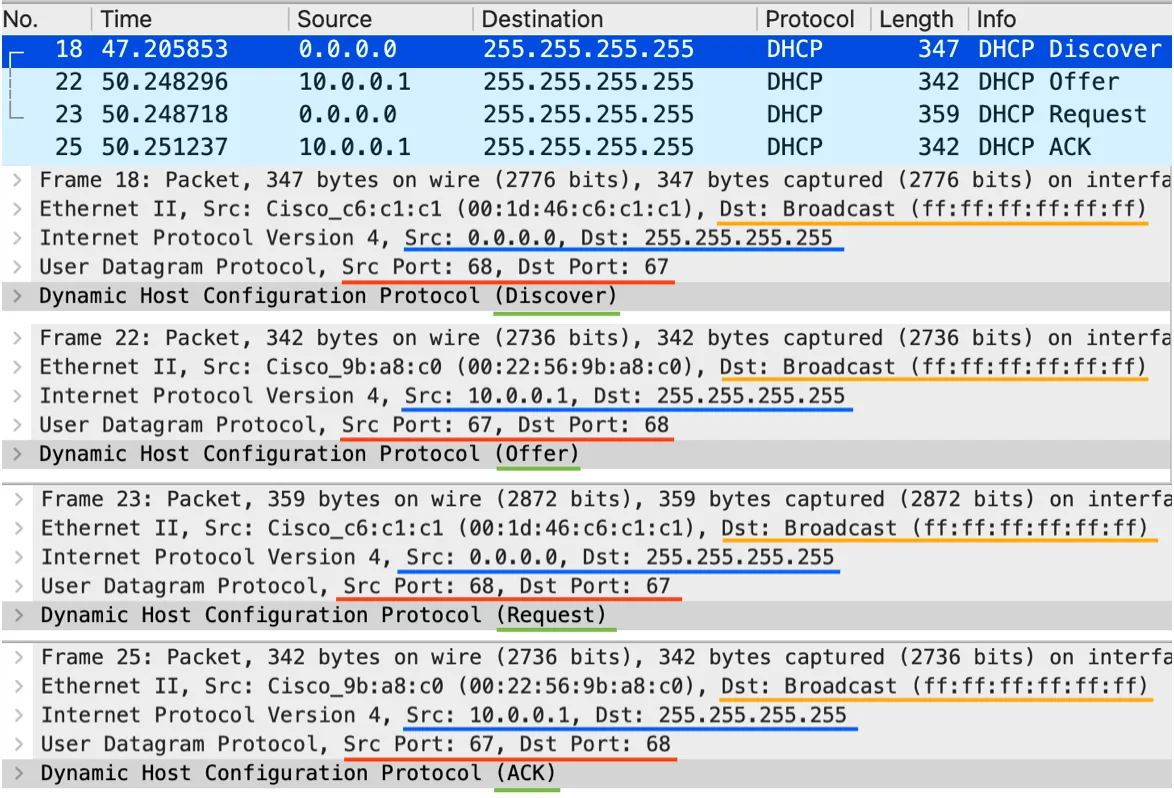
In the most basic scenario, all of the messages between a client and a server will use both a broadcast destination MAC address, and broadcast destination IP address. This can be configured differently, and I explore this in the next section.
In the following image, you can see all of the packet level details for the DORA process that are exchanged between a client and a server.
| Message | Src MAC | Dst MAC | Src IP | Dst IP | Src Port | Dst Port |
|---|---|---|---|---|---|---|
| Discover | :c1 | ff::ff | 0.0.0.0 | 255.255.255.255 | 68 | 67 |
| Offer | :c0 | ff::ff | 10.0.0.1 | 255.255.255.255 | 67 | 68 |
| Request | :c1 | ff::ff | 0.0.0.0 | 255.255.255.255 | 68 | 67 |
| Ack | :c0 | ff::ff | 10.0.0.1 | 255.255.255.255 | 67 | 68 |
Wireshark Capture (Unicast)
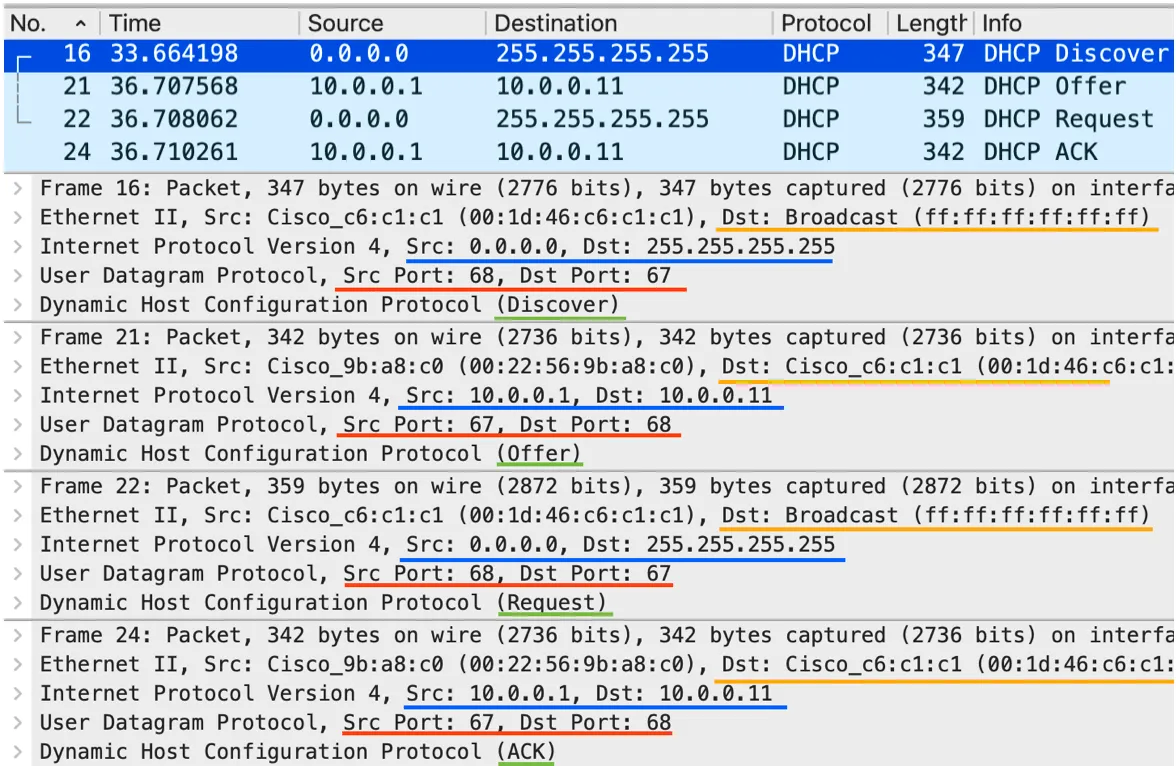
As mentioned earlier, a DHCP client can request that the DHCP server send it’s messages to a unicast destination MAC address, and a unicast destination IP address. The MAC address is the MAC address of the client and the IP address is the IP address that it is offering to the client.
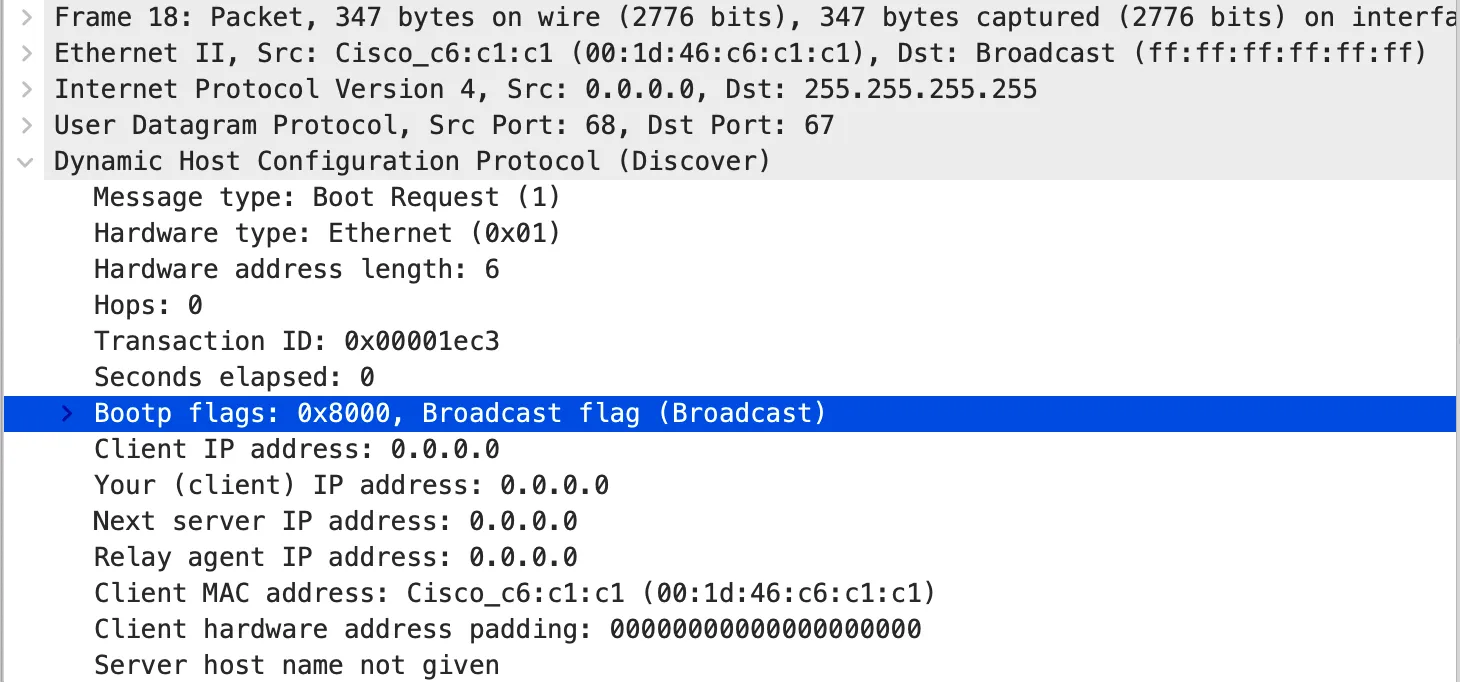
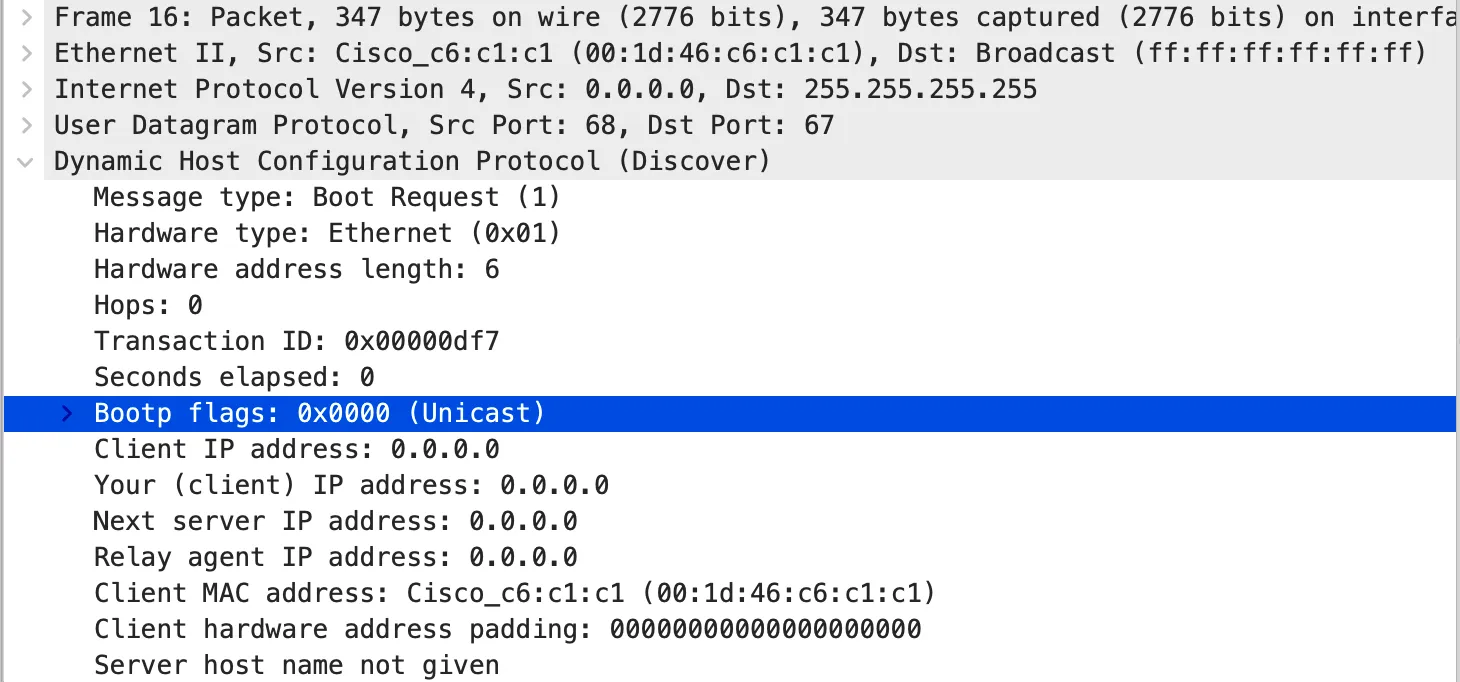
The server messages are unicast back to the client when the client sends a discover message that has the broadcast bit in the Bootp flags set to zero.
| Message | Src MAC | Dst MAC | Src IP | Dst IP | Src Port | Dst Port |
|---|---|---|---|---|---|---|
| Discover | :c1 | ff::ff | 0.0.0.0 | 255.255.255.255 | 68 | 67 |
| Offer | :c0 | :c1 | 10.0.0.1 | 10.0.0.11 | 67 | 68 |
| Request | :c1 | ff::ff | 0.0.0.0 | 255.255.255.255 | 68 | 67 |
| Ack | :c0 | :c1 | 10.0.0.1 | 10.0.011 | 67 | 68 |
Broadcast Flags
The following images demonstrate what the actual broadcast flag looks like in the packet:
Device Config
On the Cisco switch, I configured the DHCP server with the following settings:
! --- Create a pool and configure parameters
Ip dhcp pool TEST
Network 10.0.0.0 255.255.255.255.0
Dns-server 8.8.8.8
Domain-name lab.local
Exit
Ip dhcp excluded-address 10.0.0.1 10.0.0.9
!
! --- Use SVI for DHCP server IP
Int vlan 1
Ip address 10.0.0.1 255.255.255.0
No shutdown
!
! --- Used for port mirroring the DHCP traffic to wireshark
Monitor session 1 source interface f0/1
Monitor session 1 destination interface f0/2
On the Cisco router (acting as the client), I configured the following settings:
! --- Configure the interface to use DHCP
Int g0/1
Ip address dhcp
Ip dhcp client broadcast-flag clear
No shut
!

! --- Commands used for releasing DHCP lease
Release dhcp g0/1
Int g0/1
Shut
No shut